




 # Installation
I'm always releasing newer versions of binary of the software each 2-3 month with minor changes & each 6-8 month with major changes. Grab the binaries
All the binaries are located in the [releases](https://github.com/krtirtho/spotube/releases), just download
## Windows
Download the [setup file](https://github.com/KRTirtho/spotube/releases/latest/download/Spotube-windows-x86_64-setup.exe) & follow along the installer
### Chocolatey
Run the following command to install Spotube with windows chocolatey package manager
```powershell
choco install spotube
```
### Winget
Run the following command to install Spotube with new Windows Package Manager:
```powershell
winget install --id KRTirtho.Spotube
```
## Linux
### Flatpak
Run in terminal:
```shell
$ flatpak install flathub com.github.KRTirtho.Spotube
```
# Installation
I'm always releasing newer versions of binary of the software each 2-3 month with minor changes & each 6-8 month with major changes. Grab the binaries
All the binaries are located in the [releases](https://github.com/krtirtho/spotube/releases), just download
## Windows
Download the [setup file](https://github.com/KRTirtho/spotube/releases/latest/download/Spotube-windows-x86_64-setup.exe) & follow along the installer
### Chocolatey
Run the following command to install Spotube with windows chocolatey package manager
```powershell
choco install spotube
```
### Winget
Run the following command to install Spotube with new Windows Package Manager:
```powershell
winget install --id KRTirtho.Spotube
```
## Linux
### Flatpak
Run in terminal:
```shell
$ flatpak install flathub com.github.KRTirtho.Spotube
```
 ### Ubuntu/Debian/Linux Mint/Pop_!OS:
Download the [Spotube-linux-x86_64.deb](https://github.com/KRTirtho/spotube/releases/latest/download/Spotube-linux-x86_64.deb) then double click it or run
```bash
$ sudo apt install Spotube-linux-x86_64.deb
# or
$ sudo dpkg -i Spotube-linux-x86_64.deb
```
in the directory where it was downloaded
### Arch/Manjaro/Endeavour:
Run following terminal
```bash
# for `yay` users
$ yay -S spotube-bin
# for `pamac` users
$ pamac install spotube-bin
```
### AppImage:
Download the [Spotube-linux-x86_64.AppImage](https://github.com/KRTirtho/spotube/releases/latest/download/Spotube-linux-x86_64.AppImage) file & double click to run it. AppImages require [appimage-launcher](https://github.com/TheAssassin/AppImageLauncher) to be installed
## Mac OS
Download the [Mac OS Disk Image (.dmg) file](https://github.com/KRTirtho/spotube/releases/latest/download/Spotube-macos-x86_64.dmg) from the release & follow along the setup wizard
**I'll/try to upload the package binaries to linux debian/arch/ubuntu/snap/flatpack/redhat/chocolatey/homebrew stores or software centers or repositories**
# Configuration
There are some configurations that needs to be done to start using this software
You need a spotify account & a developer app for
- clientId
- clientSecret
**Grab credentials:**
- Go to https://developer.spotify.com/dashboard/login & login with your spotify account (Skip if you're logged in)

- Create an web app for Spotify Public API
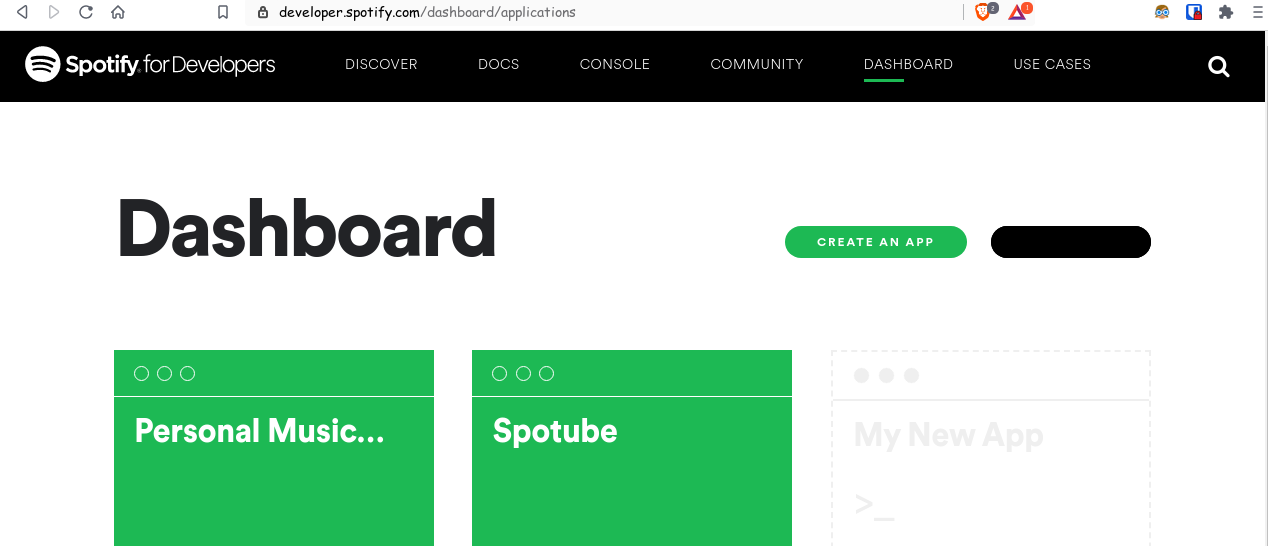
- Give the app a name & description. Then Edit settings & add **http://localhost:4304/auth/spotify/callback** as **Redirect URI** for the app. Its important for authenticating

- Click on **SHOW CLIENT SECRET** to reveal the **clientSecret**. Then copy the **clientID**, **clientSecret** & paste in the **Spotube's** respective fields

Also, you need a [genius](https://genius.com) account for **lyrics** & a API Client for
- accessToken
> **Note!**: No personal data or any kind of sensitive information won't be collected from spotify. Don't believe? See the code for yourself
# TODO:
- [x] Compile, Debug & Build for **MacOS**
- [x] Add support for show Lyric of currently playing track
- [x] Track download
- [ ] Support for playing/streaming podcasts/shows
- [x] Artist, User & Album pages
# Building from source
- Download the latest Flutter SDK (>=2.15.1) & enable desktop support
- Install Development dependencies in linux
- `libwebkit2gtk-4.0-dev`, `libkeybinder-3.0-0` & `libkeybinder-3.0-0-dev` (for Debian/Ubuntu)
- `webkit2gtk` & `libkeybinder3` (for Arch/Manjaro)
- Clone the Repo
```bash
$ flutter pub get
$ flutter run -d
### Ubuntu/Debian/Linux Mint/Pop_!OS:
Download the [Spotube-linux-x86_64.deb](https://github.com/KRTirtho/spotube/releases/latest/download/Spotube-linux-x86_64.deb) then double click it or run
```bash
$ sudo apt install Spotube-linux-x86_64.deb
# or
$ sudo dpkg -i Spotube-linux-x86_64.deb
```
in the directory where it was downloaded
### Arch/Manjaro/Endeavour:
Run following terminal
```bash
# for `yay` users
$ yay -S spotube-bin
# for `pamac` users
$ pamac install spotube-bin
```
### AppImage:
Download the [Spotube-linux-x86_64.AppImage](https://github.com/KRTirtho/spotube/releases/latest/download/Spotube-linux-x86_64.AppImage) file & double click to run it. AppImages require [appimage-launcher](https://github.com/TheAssassin/AppImageLauncher) to be installed
## Mac OS
Download the [Mac OS Disk Image (.dmg) file](https://github.com/KRTirtho/spotube/releases/latest/download/Spotube-macos-x86_64.dmg) from the release & follow along the setup wizard
**I'll/try to upload the package binaries to linux debian/arch/ubuntu/snap/flatpack/redhat/chocolatey/homebrew stores or software centers or repositories**
# Configuration
There are some configurations that needs to be done to start using this software
You need a spotify account & a developer app for
- clientId
- clientSecret
**Grab credentials:**
- Go to https://developer.spotify.com/dashboard/login & login with your spotify account (Skip if you're logged in)

- Create an web app for Spotify Public API

- Give the app a name & description. Then Edit settings & add **http://localhost:4304/auth/spotify/callback** as **Redirect URI** for the app. Its important for authenticating

- Click on **SHOW CLIENT SECRET** to reveal the **clientSecret**. Then copy the **clientID**, **clientSecret** & paste in the **Spotube's** respective fields

Also, you need a [genius](https://genius.com) account for **lyrics** & a API Client for
- accessToken
> **Note!**: No personal data or any kind of sensitive information won't be collected from spotify. Don't believe? See the code for yourself
# TODO:
- [x] Compile, Debug & Build for **MacOS**
- [x] Add support for show Lyric of currently playing track
- [x] Track download
- [ ] Support for playing/streaming podcasts/shows
- [x] Artist, User & Album pages
# Building from source
- Download the latest Flutter SDK (>=2.15.1) & enable desktop support
- Install Development dependencies in linux
- `libwebkit2gtk-4.0-dev`, `libkeybinder-3.0-0` & `libkeybinder-3.0-0-dev` (for Debian/Ubuntu)
- `webkit2gtk` & `libkeybinder3` (for Arch/Manjaro)
- Clone the Repo
```bash
$ flutter pub get
$ flutter run -d © 2022 Spotube